
Step 1: Open AliExpress Orders Page
- Click the AliBill extension icon in your Chrome toolbar
- Click "Go to AliExpress Orders"
- Alternatively, navigate directly to:
https://www.aliexpress.com/p/order/index.html - Make sure you are logged into your AliExpress account
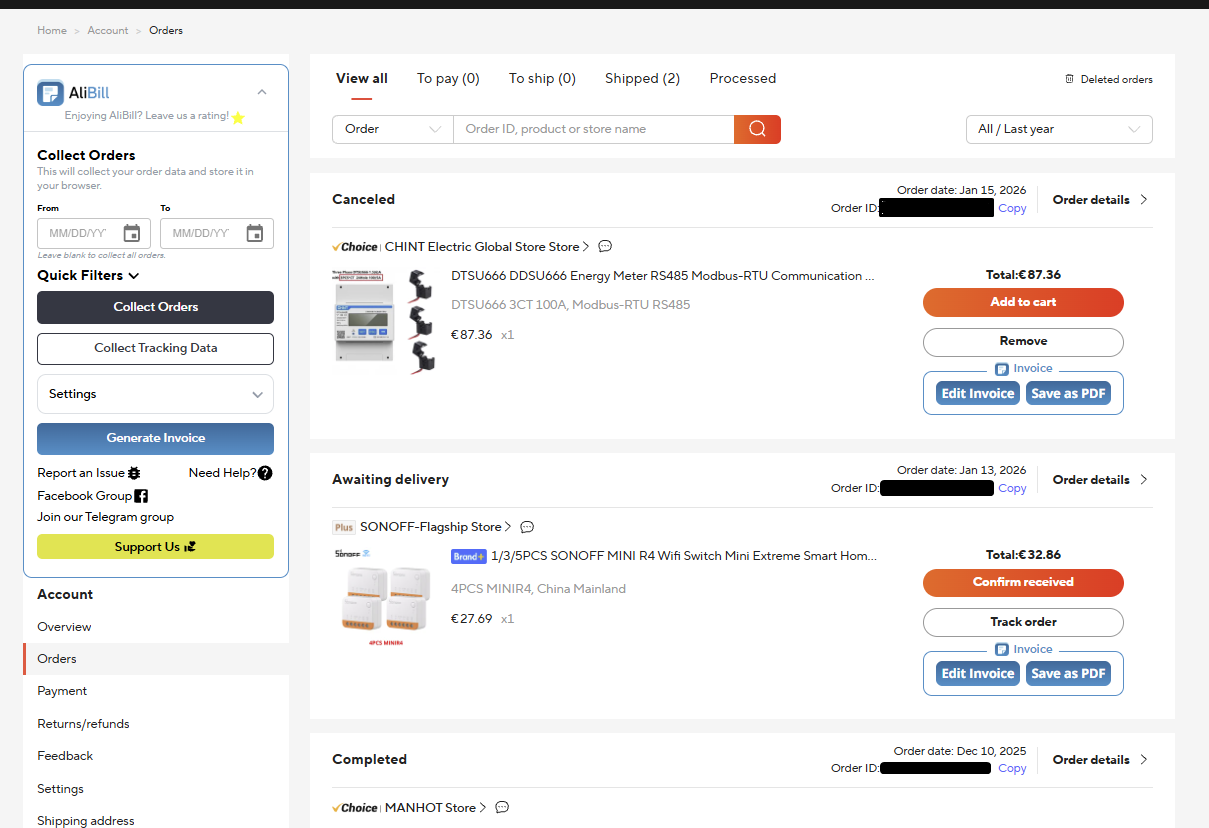
Step 2: Start Collecting Orders
On the AliExpress order list page, you'll see the AliBill menu:
- Click "Collect Orders" to start collecting all your orders
- The extension will open multiple tabs (configurable, 1-10 tabs) to collect order details
- Watch the progress indicator to see how many orders have been collected
Important: Stay on the order list page tab while collection is in progress. Don't close the browser or navigate away until collection is complete.
Step 3: Date Range for Collection (Recommended)
If you have many orders, use date range filtering to collect orders in batches:
Why Use Date Range?
- Improves performance for users with large order histories
- Reduces processing time by collecting specific date ranges
- Allows you to process orders month by month or year by year
How to Set Date Range
- In the AliBill menu on the order list page, find the "From" and "To" date fields
- Enter your desired date range, or use "Quick Filters" to quickly select a year and month
- Leave both fields blank to collect all orders
- Click "Collect Orders" after setting your date range
Tip: For users with thousands of orders, we recommend collecting orders one month at a time. This prevents timeout issues and keeps the browser responsive.
Step 4: View Stored Orders Count
To check how many orders have been collected:
- Click the AliBill extension icon in your toolbar
- Look for "Orders stored locally" in the popup
- This shows the total count of orders saved in your browser's local storage
Step 5: Clear Stored Data (If Needed)
To remove all stored order data and start fresh:
- On the AliExpress order list page, find the AliBill menu
- Click the delete icon
- Confirm "Delete all stored orders?" when prompted
- This permanently removes all stored order data from your browser
Warning: Deleting stored data is permanent. Consider exporting your orders to JSON first as a backup.
Next Steps
Now that you have collected orders, you're ready to generate documents: